Learn Chinese Learn Culture · Published by Dawnflower Publishing Australia

DIGITAL RESOURCES

Keep the learning going
beyond the page.

Connect Learn Chinese Learn Culture with QR audio, Education Perfect lessons, Quizlet flashcards and Blooket revision games.

TEXTBOOK AUDIO

Scan. Listen. Learn.

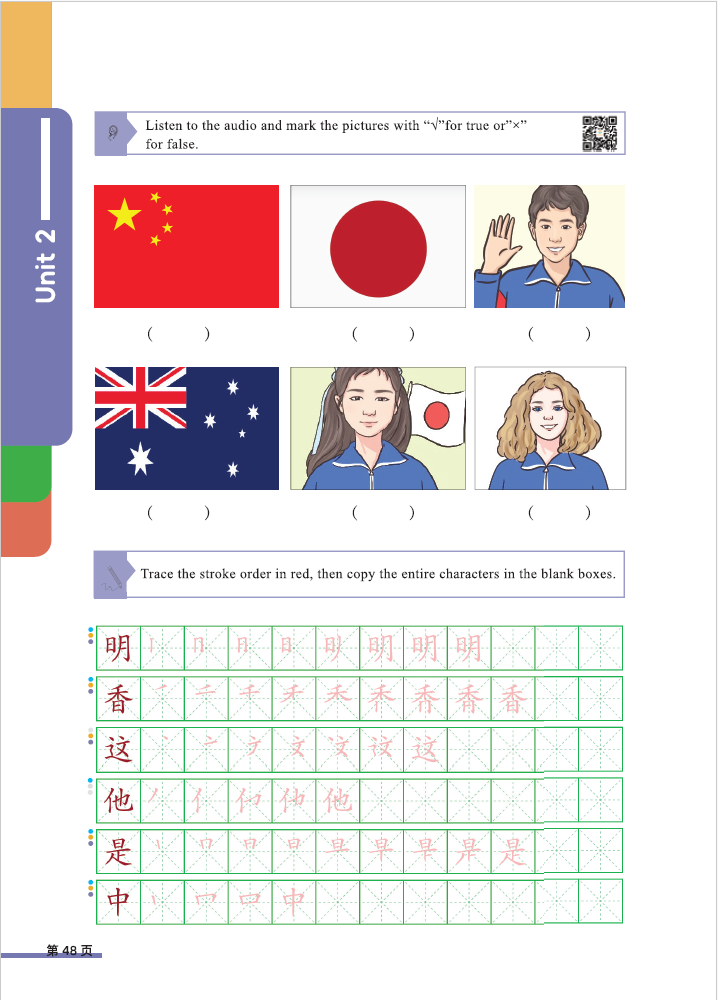
QR codes beside listening tasks and texts in updated editions link to the corresponding audio. Open your device’s camera, scan the code and follow the link.

  1. Find the QR code next to the text or activity.
  2. Open the link on your phone, tablet or computer.
  3. Listen, pause and replay to suit the lesson.
See a listening sample
Textbook listening exercise with a QR audio code and character writing practice
EDUCATION PERFECT

See, hear and practise.

The series’ digital lessons connect textbook language with interactive practice:

  • Text presentations and audio
  • Sentence models and grammar support
  • Stroke-order animations
  • Vocabulary, listening and reading with immediate feedback
  • Songs, interactive activities and culture videos
Ask about digital access
QUIZLET

Keep vocabulary familiar.

Lesson-linked flashcards give students another way to revisit words and meanings from Learn Chinese Learn Culture.

Use them to prepare for a lesson or return to vocabulary after classroom practice.

Ask for matching flashcards
BLOOKET

Bring revision into play.

Vocabulary sets support teacher-led classroom games, offering a shared way to revisit lesson language.

Ask which sets match the book and unit your class is studying.

Ask about vocabulary games

Contact us to confirm the resources available for your book and edition, and any platform account or subscription requirements.

Digital resource questions

Where do I find the audio?

Scan the QR code printed beside the activity or text in your edition. If your copy does not have a code, contact us with the book and page number.

Are digital subscriptions included with a textbook?

Contact us to confirm what is included with your edition and which digital services require separate school access.

Can I use the audio in class?

Open the activity’s audio link on your classroom device and play it through your usual speakers. If a school network blocks the link, share the details with your IT team or contact us.